



Blog
For a clinic buying a portable ultrasound machine, start with the longest stretch of scanning between reliable charging opportunities. CHISON lists 180+ minutes of scanning and 36+ hours of standby for the SonoAir 60, a laptop-style system weighing 2.1 kg with its battery. For a team moving between rooms, the scanning figure is the one to discuss at a demo. Ask the supplier to reproduce your probe selection, Doppler use and screen brightness before budgeting those minutes into a shift.
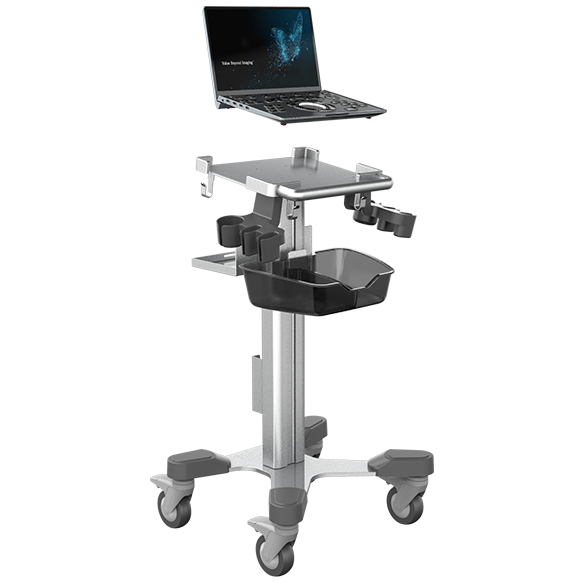
Consider an outreach clinic with eight appointments before lunch and 12 active scanning minutes per appointment. That adds up to 96 minutes of imaging. It also leaves time on battery for patient setup, image review, saving studies and moving equipment. A 96-minute scanning requirement does not tell you how much charge will remain at lunch. Run the whole appointment block and record both active minutes and elapsed time.
The figures below answer three different purchasing questions. Each link leads to the manufacturer’s description of the configuration or test.
System and source | Published figure | How to use it in a buying decision |
180+ minutes scanning; 36+ hours standby | For a laptop carried between rooms, test a morning list on the quoted system. The product page gives separate figures but does not specify the imaging-mode mix. | |
Up to 8 hours of continuous scanning with U-bank | Ask for the battery companion in the demonstration and quote. The figure applies to that configuration. | |
50 minutes of continuous scanning under specified conditions | GE specifies a new, fully charged battery at 22°C, with 80% grayscale and 20% color Doppler. Include the phone or tablet battery when testing a handheld workflow. |
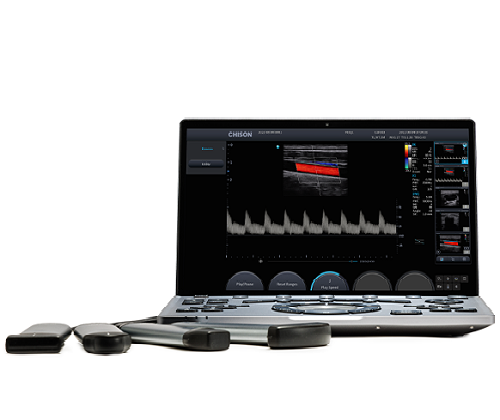
Scanning time describes time spent acquiring images under the manufacturer’s stated conditions. Ask whether acquisition ran continuously, which probe was connected and how often color Doppler was active. Typical-use runtime can include pauses between exams. Ask for the scan-to-pause ratio. Standby time describes how long a system can wait in a low-power state. Use that figure when planning storage between sessions.
For example, two suppliers can both quote three hours while testing different tasks. If one runs continuous B-mode and another alternates scanning with idle periods, request the underlying protocols before putting those figures in the same column of a tender.
Bedside rounds. For point-of-care ultrasound, count the short scans on a typical round and the time spent opening, documenting and transferring each study. If you use a handheld ultrasound device, record the charge on the probe and the compatible display separately wherever each has its own battery. An available probe is little help when the tablet is back at the charging station.
Multi-room clinics. A laptop-style portable ultrasound device lets staff move the display and controls together. When evaluating the SonoAir 70, record the charge before the first exam and after the last transfer between rooms. Include image review and reporting in the timed session.
Outreach and veterinary field visits. Map the longest route between outlets. When selecting a portable vet ultrasound machine, ask which charging accessories the manufacturer supports for that exact model. If a spare is available, have the supplier demonstrate the changeover and show whether the current study stays open. Include the spare, charger and carrying weight in the quote.
1. Prepare the quoted configuration. Fully charge the system and any separate display. Record the model, battery condition, probe, brightness, network connection and starting charge.
2. Reproduce your busiest unplugged block. Use a suitable training phantom or approved demonstration workflow. Follow your usual sequence of scanning, freezing, reviewing, saving and moving between rooms.
3. Record what each battery delivered. Note active imaging minutes, elapsed time, charge remaining and any interruption. For a cart-assisted test, identify when the external battery supplied power.
4. Test the recharge window. Plug in during the break your team actually has. Record the charge recovered by the next appointment. Ask for the local replacement cost, expected service turnaround and whether staff can change the battery themselves.
CHISON lists 36+ hours for standby and 180+ minutes for scanning. For an unplugged exam list, use the scanning figure as your starting point and confirm performance with the probes and modes your team uses.
A handheld can suit repeated short bedside exams when the probe and display can recharge between rounds. For long uninterrupted sessions, compare active scanning time, supported charging options and the equipment you need to carry to the bedside.
Request an itemized quote for the system battery, compatible charger, any supported spare or external battery, replacement terms and local service. For a wireless probe, identify who supplies the display and its charger.
Request a CHISON portable ultrasound demonstration. Share your longest unplugged session, the probes and imaging modes you use, and the charging time available between rounds.
Contact Us
Copyright © CHISON Medical Technologies Co., Ltd. All Rights Reserved | Privacy and terms of use
Products: Vascular Ultrasound Machine MSK Ultrasound Machine Portable Ultrasound Device Portable Ultrasound Machine for Sale Portable Ultrasound Machines For Pregnancy Handheld Ultrasound For Pregnancy Handheld Veterinary Ultrasound Veterinary Ultrasound Machine Portable Vascular Ultrasound Portable Ultrasound Machine for Cattle and Livestock

CHISON respects your privacy. We use cookies to make our site more personal and enhance your experience. Read our Private Policy to learn more about cookies and how to manage them. You agree to our use of these technologies when you visit our site.
We appreciate your feedback
We sincerely invite you to participate in our survey for helping us to improve our digital market.
*1.How fast does the website load?
*2.Does the products displayed on the website interest you?
*3.How easy is it for you to find the information you need?
4.What information or service do you suggest we can offer?

THANKS
Thank you for sharing your thoughts with us. We’re highly appreciated your every feedback.
Sorry!
THANKS
Thank you for sharing your thoughts with us. We’re highly appreciated your every feedback.
